

Сүрөттөө
Instinctor is a complete business platform in one WordPress plugin.
It replaces the page builder, WooCommerce, the booking plugin, the membership plugin, the chat widget and the SEO plugin, and it does more than any of them. Whatever the business, it runs on Instinctor. instinctor.com is built entirely with it: that is the plugin running, not a mockup.
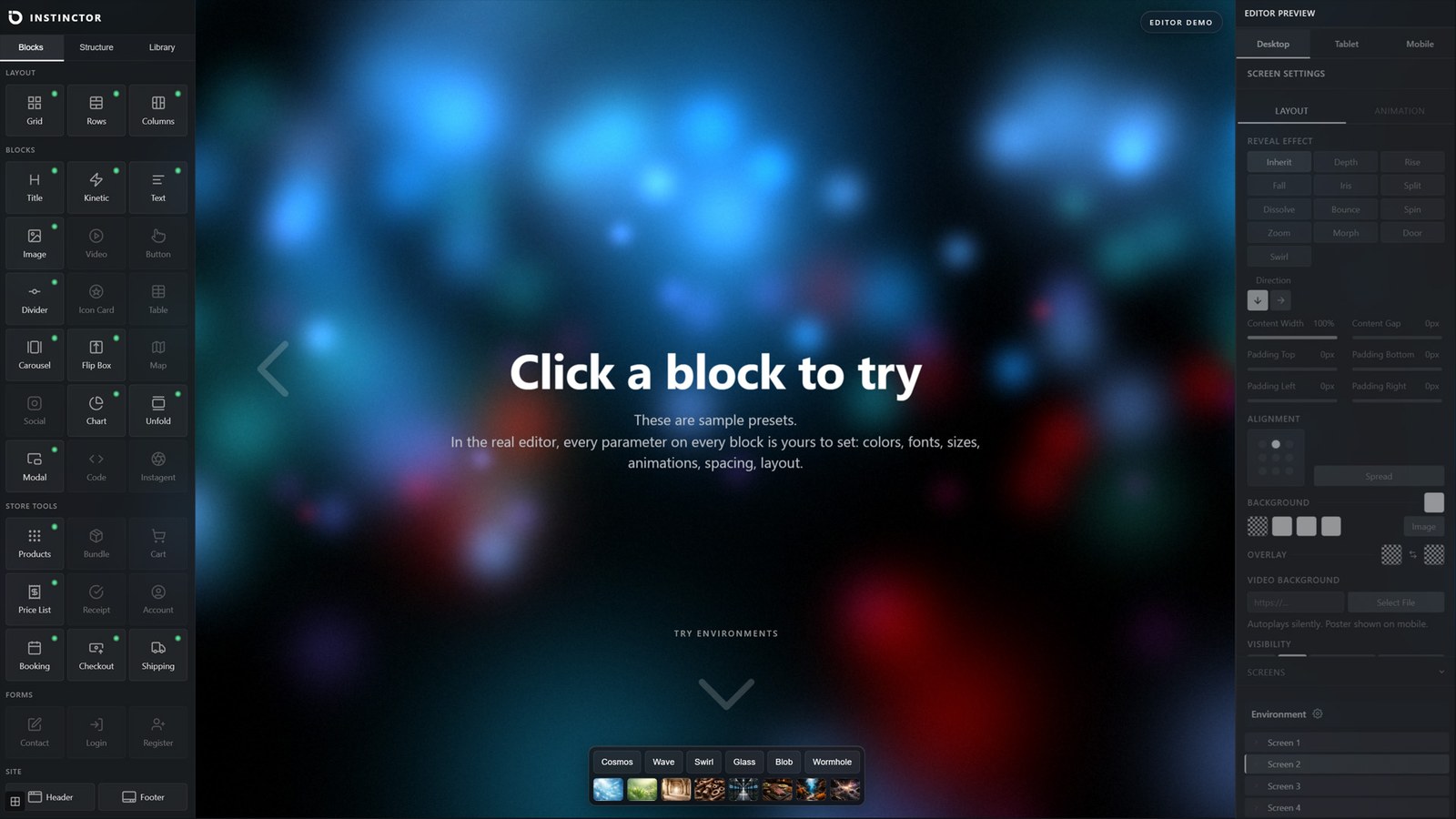
Impulse, the editor, builds animation of a grade you would expect from After Effects, directly in the browser, and keeps it light and fast on any phone. More than a hundred built-in animations, combinable into thousands, every parameter adjustable.
Sell anything. Physical and digital products, bookings and appointments, with full or partial payment. Subscriptions and memberships with Instinctor Pro.
Answer customers. Live chat on every page, captured as leads. Automatic smart replies and SMS/WhatsApp alerts with Pro.
Get found. Per-page SEO, sitemaps and redirects. Structured data with Pro.
Free to start, no page limit. The editor runs every animation free, so you see exactly what you are building; publishing the WebGL environments and kinetic motion to visitors, and turning your own photos into 3D depth, is Pro.
Start with one page. Instinctor renders only the pages you build with it and leaves your theme and existing pages alone, so you can try it without rebuilding the rest of your site.
What it does
Bookings and appointments. Customers pick a service and a time on your site. Each service can carry its own deposit, taken through Stripe when the booking is made, so a no-show still leaves you paid.
A real store. Unlimited physical and digital products with variants, discount codes, quantity discounts, stock control, tax rules, gift cards and loyalty points. Checkout through Stripe, PayPal or Authorize.net. Returns, refunds, packing slips, order tracking and editable order emails are included. No WooCommerce required.
Live chat. Visitors message you from any page. You answer from the dashboard, and every conversation is kept as a lead with an email alert.
SEO. Per-page titles and descriptions, canonical URLs, noindex control, a search preview and a page health score, XML sitemaps and redirects.
One editor for the whole site. Sections, Grid, Rows and Columns layouts, and every content block: text, images, video, maps, forms, navigation, header, footer, posts, tables, reviews, price lists, team, flip boxes, charts, plans and ecommerce blocks. Desktop, tablet and mobile are controlled separately.
Classic or Cinematic pages. Classic pages scroll normally. Cinematic pages move screen by screen with per-screen transitions and optional looping.
The animation engine. A kinetic text engine with 34 compositions and 62 motions, twenty section reveal effects, animated headlines, text reveals, animated dividers, gradient borders, animated gradient backgrounds, WebGL environments, 3D depth, Motion Walls and 3D carousels. Reveals, headlines, dividers, borders and gradient backgrounds publish on the free version, and so does 3D depth on images that already carry a depth map; processing your own photos into 3D depth, and the rest, run in the editor free and publish with Pro.
Free and Pro
Instinctor is free to install and build with, with no page limit. Instinctor Pro is a separate plugin from instinctor.com, installed alongside this one. Pro adds:
- WebGL environments, kinetic headings, Motion Walls and section effects on published pages, and 3D depth for your own photos
- Automatic smart chat replies, and SMS and WhatsApp alerts
- Open Graph, Twitter cards and structured data output
- Product bundles, subscriptions and memberships
- A custom-designed checkout
- Industry business types (restaurant, salon, instructor, home services, automotive, 3D-printing quotes)
Source code
The plugin ships as source. The .js files in assets/js/ are the canonical, hand-written source: no transpiler, bundler, or build step is involved. A few engine files (impulse-3d-effects.js, impulse-motion-lava.js, impulse-fx-engine.js, impulse-wave.js, impulse-animations.js) are written densely on single lines for performance, but each statement is normal readable JavaScript. PHP is unobfuscated. Third-party libraries under assets/js/vendor/ ship in their original minified form; see assets/js/vendor/README.txt for versions, licenses, and source URLs. For a copy of the development repository, contact instinctor@instinctor.com.
External Services
This plugin connects to the following external services. Each connection is described below including what data is sent and when.
Stripe
Used for payment processing when Stripe is enabled in Settings Payments. Customer payment data is submitted directly to Stripe and is not stored on your server.
- Service: https://stripe.com
- Terms: https://stripe.com/legal
- Privacy: https://stripe.com/privacy
PayPal
Used for payment processing when PayPal is enabled in Settings Payments. When a customer chooses PayPal at checkout, the order amount and currency are sent to PayPal’s REST API at api-m.paypal.com (or api-m.sandbox.paypal.com in test mode) to create and capture the order. No data is sent unless PayPal is enabled and selected at checkout.
- Service: https://paypal.com
- Terms: https://www.paypal.com/us/legalhub/useragreement-full
- Privacy: https://www.paypal.com/us/legalhub/privacy-full
Authorize.Net
Used for payment processing when the Authorize.Net gateway is enabled in Settings Payments. When a customer pays, the checkout page loads Authorize.Net’s Accept.js library from js.authorize.net (or jstest.authorize.net in test mode) to tokenize the card in the browser, and the resulting payment token plus the order amount and billing details are sent to Authorize.Net’s API at api.authorize.net (or apitest.authorize.net in test mode) to process the transaction. No card data touches your server, and no data is sent unless the Authorize.Net gateway is enabled and selected at checkout.
- Service: https://www.authorize.net/
- Terms: https://www.authorize.net/about-us/terms.html
- Privacy: https://www.visa.com/en-us/legal/privacy-policy
AI features (via Instinctor Platform relay)
Used by Instagent (smart live chat) and the SEO workspace features. When these features are used, page content, product data, and chat messages are sent to the Instinctor Platform relay at platform.instinctor.com, which forwards them to an AI provider on the plugin’s behalf. No AI provider API key is entered or stored on your site. These features are opt-in via the platform consent notice (see the Instinctor Platform section below).
- Service: https://platform.instinctor.com
- Terms: https://instinctor.com/terms
- Privacy: https://instinctor.com/privacy
SMS notifications (via Instinctor Platform relay)
Used for SMS notifications (Instinctor Pro feature). Notification content and recipient phone numbers are sent to the Instinctor Platform relay at platform.instinctor.com, which delivers the message through its downstream SMS carrier (Telnyx). The plugin does not contact the carrier directly and no carrier credentials are entered on your site.
- Service: https://platform.instinctor.com
- Terms: https://instinctor.com/terms
- Privacy: https://instinctor.com/privacy
Transactional email (via Instinctor Platform relay)
Used for transactional email delivery when the relay mailer is selected in Settings Email. Email content and recipient addresses are sent to the Instinctor Platform relay at platform.instinctor.com, which delivers the message through its downstream email provider. The plugin does not contact the email provider directly and no email-provider credentials are entered on your site.
- Service: https://platform.instinctor.com
- Terms: https://instinctor.com/terms
- Privacy: https://instinctor.com/privacy
ExchangeRate-API
Used by the multi-currency feature to fetch exchange rates when an API key is configured in Settings Currency. The base currency code is sent to the API. Off by default; only used when an API key is configured.
- Service: https://www.exchangerate-api.com/
- Terms: https://www.exchangerate-api.com/terms
- Privacy: https://www.exchangerate-api.com/privacy
USPS Shipping API
Optional. Used by the order-tracking feature to fetch tracking events for shipments routed via USPS. Requests are sent to the USPS Web Tools API at secure.shippingapis.com with the tracking number. Off by default; only used when USPS credentials are configured in Settings Shipping.
- Service: https://www.usps.com/business/web-tools-apis/
- Terms: https://www.usps.com/business/web-tools-apis/general-api-developer-guide.htm
- Privacy: https://www.usps.com/privacy-policy/
AfterShip
Optional. Used by the order-tracking feature to fetch tracking events across multiple carriers. Tracking number + carrier slug are sent. Off by default; only used when an AfterShip API key is configured in Settings Shipping.
- Service: https://www.aftership.com/
- Terms: https://www.aftership.com/legal/terms-of-service
- Privacy: https://www.aftership.com/legal/privacy
Google PageSpeed Insights
Used only when you click Measure in SEO a page Page Speed. The page’s public URL is sent to Google, which loads that URL and returns its performance score. No personal or visitor data is sent, and nothing is sent automatically: the call happens only on that click, and the result is cached for 24 hours.
- Service: https://developers.google.com/speed/docs/insights/v5/get-started
- Terms: https://developers.google.com/terms
- Privacy: https://policies.google.com/privacy
IndexNow (search-engine index notification)
Optional. Used by the SEO tools to tell participating search engines (via the IndexNow protocol, used by Bing and Yandex) when your pages are published or updated, so they recrawl sooner. When an IndexNow key is configured in Settings, the changed page URLs, your site host, and that key are sent to api.indexnow.org. Off by default; nothing is sent unless an IndexNow key is set.
- Service: https://www.indexnow.org/
- Terms: https://www.indexnow.org/faq
- Privacy: https://privacy.microsoft.com/privacystatement
Google Maps
When a page includes a map block, the front end embeds a Google map in an iframe from maps.google.com so visitors can see the location. This loads only on pages that contain a map block, only when a visitor views that page, and needs no API key. In the editor, a map block’s live preview optionally loads the Google Maps JavaScript API from maps.googleapis.com when a Maps API key is set in Settings (admin-side only). The plugin does not use Google Places or address autocomplete.
- Service: https://developers.google.com/maps
- Terms: https://cloud.google.com/maps-platform/terms
- Privacy: https://policies.google.com/privacy
YouTube and Vimeo (video embeds)
When a page author adds a video block with a YouTube or Vimeo URL, the front end embeds that video in an iframe from www.youtube.com or player.vimeo.com. The embed loads only on pages where a video block is present, and only when a visitor views that page.
- YouTube: https://www.youtube.com/t/terms, https://policies.google.com/privacy
- Vimeo: https://vimeo.com/terms, https://vimeo.com/privacy
Outbound links (carrier tracking and social sharing)
The order-tracking feature builds plain outbound hyperlinks to carrier tracking pages (UPS, FedEx, DHL, USPS, Amazon, Royal Mail, Canada Post, and others), and designer profile / share buttons build hyperlinks to social networks (X/Twitter, LinkedIn, WhatsApp). These are ordinary links the visitor may click. The plugin does not transmit any data to those destinations on its own.
Instinctor Platform (platform.instinctor.com and instinctor.com)
The plugin can connect to two Instinctor hosts: platform.instinctor.com for AI relays, transactional email and SMS, the section/shape libraries, plugin updates, and the designer marketplace; and instinctor.com for license validation, which is contacted at instinctor.com/wp-json/instinctor/v1/license. All connections are OFF by default. On first login an admin banner asks “Connect Instinctor to platform.instinctor.com?” with Connect / No thanks buttons; the plugin only contacts the platform after the site owner clicks Connect, or after they take an explicitly opt-in action (entering a license key, clicking Subscribe, submitting the registration email). Consent can be revoked any time in Instinctor Settings Privacy.
Every endpoint below sends the site URL plus, where noted, additional payload data. No call fires unless the user has opted in or taken the corresponding explicit action.
GET instinctor.com/wp-json/instinctor/v1/license: License validation against the instinctor.com host. Sends: license key + site URL. Fires when the plugin validates an activated license key.POST platform.instinctor.com/api/validate: License key activation. Sends: license key + site URL. Fires when the admin enters and activates a license key.POST /api/checkout: Stripe checkout session creation. Sends: admin email + plan + billing interval + site URL. Fires when the admin clicks Subscribe / Upgrade.POST /api/register: Free license registration. Sends: email + site URL + plugin version. Fires when the admin submits the registration email in the admin banner.GET /api/version: Plugin update check. Sends: nothing beyond the request. Fires when WordPress checks for plugin updates (only after consent).POST /api/relay/email: Transactional email relay. Sends: recipient + subject + body. Fires when the store sends a transactional email (order confirmation, etc.) AND the relay mailer is selected. Optional.POST /api/relay/sms: Transactional SMS relay. Sends: recipient phone + message. Fires when SMS notifications are configured to use the relay. Optional.POST /api/relay/ai-help: Instagent help-mode AI query. Sends: user’s question + editor context + license key. Fires when the editor user submits a question in the Help panel.POST /api/relay/ai-help-chunk: KB article fetch. Sends: article slug + license key. Fires when the editor user clicks a Help-panel topic.POST /api/relay/<task>: AI content/SEO/chat relay. Sends: task params + license key. Fires when the user invokes an AI feature (AI write, SEO suggestions, AI chat reply).GET /api/graphics/sandbox-3d: Curated 3D image library index for the hero sandbox. Sends: nothing. Fires when an editor user opens the hero-sandbox 3D picker.POST /api/admin/library/sections/create: Admin-only upload to the platform section library. Sends: element tree + HTML preview + platform token. Fires only when an admin clicks “Push to library”.GET /api/sections,GET /api/shapes: Template/shape library index reads. Sends: nothing. Fires when the user opens the corresponding picker.POST /api/report: Migration / support ticket relay (marketing site only). Sends: email + site URL + message. Fires when a visitor submits the migration form.POST /api/public/subscribe-solo: Self-serve signup. Sends: email + chosen slug + referral code. Fires when a visitor submits the signup form on the marketing site.GET /api/public/designer/<slug>: Designer profile read. Sends: nothing. Fires when a designer’s public profile page is viewed.POST /api/referral/apply,GET /api/referral/stats: Affiliate signup + stats. Sends: form values / referral code. Fires only when the partner-program admin uses those screens.-
POST /analytics_ping: Anonymous daily usage ping. Sends: PHP version + WP version + plugin version (no user data). Fires once per day only if the admin has separately opted into “Help improve Instinctor” in Settings Privacy AND the platform consent above is granted. -
Website: https://instinctor.com
- Privacy policy: https://instinctor.com/privacy
- Terms of service: https://instinctor.com/terms
Скриншоттор




Орнотуу
From WordPress admin:
- Go to Plugins Add New
- Search for “Instinctor”
- Click Install Now, then Activate
- Open Instinctor from the admin sidebar
- Configure your site in Instinctor Set up your site
- Create your first page in Instinctor Impulse
Manual installation:
- Download the plugin zip from WordPress.org
- Go to Plugins Add New Upload Plugin
- Upload the zip and activate
- Open Instinctor from the admin sidebar
FAQ.KG
-
What is free and what is Pro?
-
Everything listed in the description above is free, with no page limit and no time limit. Pro is a separate plugin from instinctor.com that adds published WebGL environments and motion effects, automatic smart chat replies, SMS and WhatsApp alerts, Open Graph and structured data output, bundles, subscriptions, a custom checkout and the industry business types.
-
Why does an effect move in the editor but not on my published page?
-
Some motion effects are part of Pro. The editor shows them in full so you can see what they do, and labels each one on the block with “editor preview, publishes with Pro”. On a free published page that effect is left out and the content stays: an animated heading publishes as static text, a 3D carousel as a plain one. Nothing is broken, and nothing is shown to your visitors about Pro.
-
How do I take bookings?
-
Set the business type to Services in Instinctor Set up your site, add your services with durations and optional deposits, then place a booking form on any page. Deposits are taken through Stripe once your Stripe keys are entered in Settings Payments.
-
What happens to my data if I deactivate the plugin?
-
Products, orders, customers, bookings and chats live in the plugin’s own database tables, separate from WordPress posts. Deactivating stops the pages built with Instinctor from rendering, and leaves all of that data in place. Reactivating restores everything as it was. Payments made through Stripe or PayPal remain in your own account with those providers.
-
Does this require WooCommerce?
-
No. Instinctor includes its own ecommerce system: products, cart, checkout, orders, and payments. It does not depend on WooCommerce.
-
Will it conflict with my existing page builder?
-
Impulse pages are managed independently. Pages built with other builders or the theme are not affected. Both can be used on the same WordPress install.
-
How does it interact with my theme?
-
On Impulse pages, the plugin renders its own template instead of loading the theme’s header, footer, or stylesheet. The theme remains active and unchanged on non-Impulse pages.
-
What payment methods are supported?
-
Stripe (credit/debit cards, Apple Pay, Google Pay, Link), PayPal, and Authorize.net. All require credentials configured in Settings Payments.
-
Do I need an AI key for the chat?
-
No. The free version is live chat that you answer yourself. Automatic smart replies are part of Instinctor Pro and run through the Instinctor Platform relay (platform.instinctor.com). No OpenAI or other AI API key is ever entered on your site.
-
Can I receive SMS or WhatsApp notifications?
-
SMS and WhatsApp notifications are available in Instinctor Pro at instinctor.com, delivered through the Instinctor Platform relay (platform.instinctor.com). The version on WordPress.org includes email notifications only.
-
Where can I get help?
-
Use the support panel inside the plugin, visit instinctor.com/docs, or email helpdesk@instinctor.com.
-
Why is Three.js bundled locally instead of loaded from a CDN?
-
The plugin serves Three.js (r185, MIT) from its own assets directory rather than a CDN so the site stays self-contained, works behind a Content Security Policy, and never leaks visitor data to a third party. Three.js now ships as ES modules only, but the 3D effects engine loads it as a classic-script global, so the official r185 module distribution is bundled into an equivalent global build with esbuild (no library source is modified; the MIT license banner is preserved). See assets/js/vendor/README.txt for the exact build command. Three.js is a client-side rendering library with no network, storage, or server-side surface, and r185 has no known security advisories.
-
Impulse is a visual page builder. The styling for every block is computed from user-chosen settings (gradients, layered animation parameters, per-device overrides, custom fonts) and is unique to each rendered page, so the CSS cannot be pre-shipped as a static file. The same applies to a small number of runtime initializers that need the page’s element_tree as configuration. All emitted CSS and JS is escaped through esc_attr / esc_html / wp_json_encode where it embeds user-supplied values, and the JavaScript bundles themselves are enqueued via wp_enqueue_script.
Сын-пикирлер

Contributors & Developers
“Instinctor – Bookings, Store, Live Chat and SEO” is open source software. The following people have contributed to this plugin.
Мүчөлөрү
Translate “Instinctor – Bookings, Store, Live Chat and SEO” into your language.
Interested in development?
Browse the code, check out the SVN repository, or subscribe to the development log by RSS.
Өзгөртүүлөр
2.1.08
- Bookings are free: the Booking block works and publishes without Pro.
- Editor: a block whose effect previews in the editor but is left out of a free published page now says so on the block itself, with the effect named, so a still published page is never mistaken for a fault.
- Editor: animated headings render exactly as they publish with Pro, in every composition and per-line mode.
- A free published page keeps every word of an animated heading as static text.
- Fixed a fatal error on pages of a WordPress site installed in a subfolder.
2.1.07
- A published page now uses exactly the environment colours set in the editor. A page could publish in a different palette from the one on screen while it was designed.
- The Cosmos environment fills a phone screen instead of rendering almost black. Its clouds were spread for a wide screen and most of them fell outside a narrow one.
- Some motion effects are part of the Pro build. They render in the editor so you can see what they do, and a published page renders without them: 3D Title outline and depth modes, the carousel’s 3D modes, marquee drift, image cutout and halftone, the script-driven image hover effects, and custom 3D models. Text, layout, colours and links are unchanged.
2.1.06
- Settings: fields render at their intended size on WordPress 7.0, which had raised its own minimum for form controls.
- Settings: the middle column balances its panels instead of leaving a gap under the last one.
- Editor: changing a setting no longer reverts when a previous edit is still saving.
- Tables: invisible spacing pasted in from a word processor no longer pushes a cell out of line with its row.
- Dividers: the electric style is no longer cut off at the top and bottom when Fade edges is on.
- Security: an uploaded file is now named for the type it actually is, never for the extension it was given.
2.1.05
- Editor: the screen strip on the canvas edge gains a + to add a screen after the one you are on, a hover menu to rename, duplicate or delete a screen, and drag to reorder.
- Editor: the strip now marks which screen is on the canvas, and holds its size instead of shrinking with the canvas.
- Accessibility: the mobile menu button announces itself, reports open or closed, and moves focus into the menu and back out again.
- Accessibility: an animated headline now exposes one clean copy of its text instead of every animated fragment.
- Fixed: a page could emit the same id on several style tags.
- Settings reads as a business rather than a store, so the first screen does not assume you are selling.
2.1.04
- New: position a background or image by dragging the picture itself. Choose exactly what stays in view, instead of picking from fixed presets.
- New: per-device image sizing. Keep an image large on desktop and set a smaller size for phones.
- New: alignment and pin-to-top / pin-to-bottom are set per device. A block can sit at the bottom on desktop and centred on a phone.
- New: section gradients gain a Placement control. Spread the four colours across the whole section, its edges, its corners, or only the top or bottom edge.
- Page library: pages are grouped into folders, and you can drag them into the order you want.
- Editor: a block hidden on a device now looks hidden while you work on that device, section numbers sit on the canvas edge, and the selected section is marked with a light rule instead of a heavy outline.
- Contact forms can send visitors to a page of your choosing after a successful submission.
- Header: hiding the site name now works, and the site name can take the wordmark styling.
- Accessibility: animated headlines expose one clean copy of the text to screen readers instead of every animated fragment.
- Fixed: per-device edits are saved against the device tab you are working on, so a change made on the Mobile tab no longer lands on Desktop.
- Refined how sections lay out when a block is pinned to the bottom of the screen.
2.1.03
- Media uploads and image handling improved on WordPress installs.
- Editor: single-click delete in the Structure panel, per-cell alignment now applies to every block type, grid cells inherit the section’s content gap.
- Motion: kinetic headlines with Loop off now settle and stay still; flip boxes hold their padding while being edited.
2.1
- Maintenance release.
2.0
Initial public release.