

Сүрөттөө
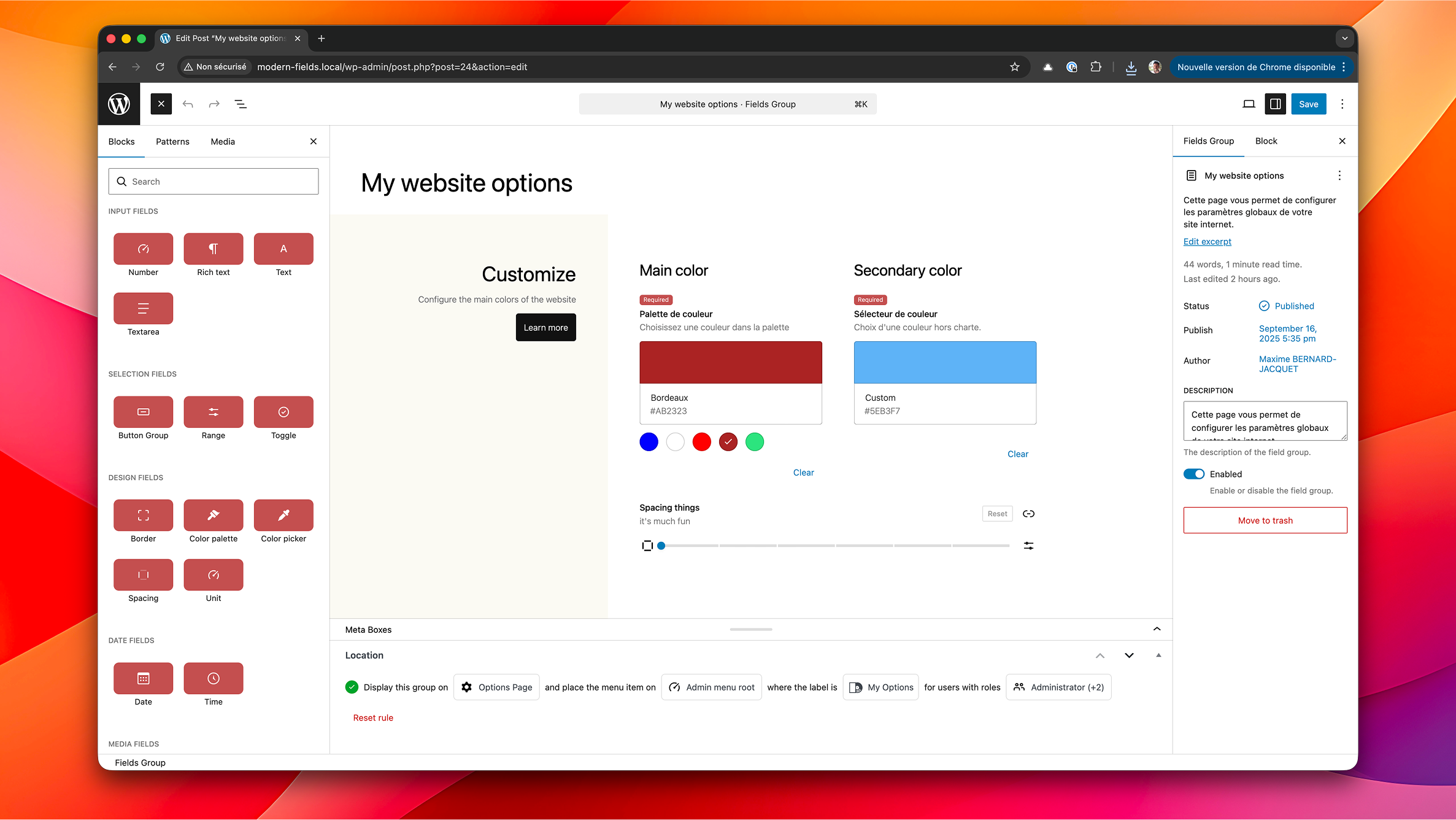
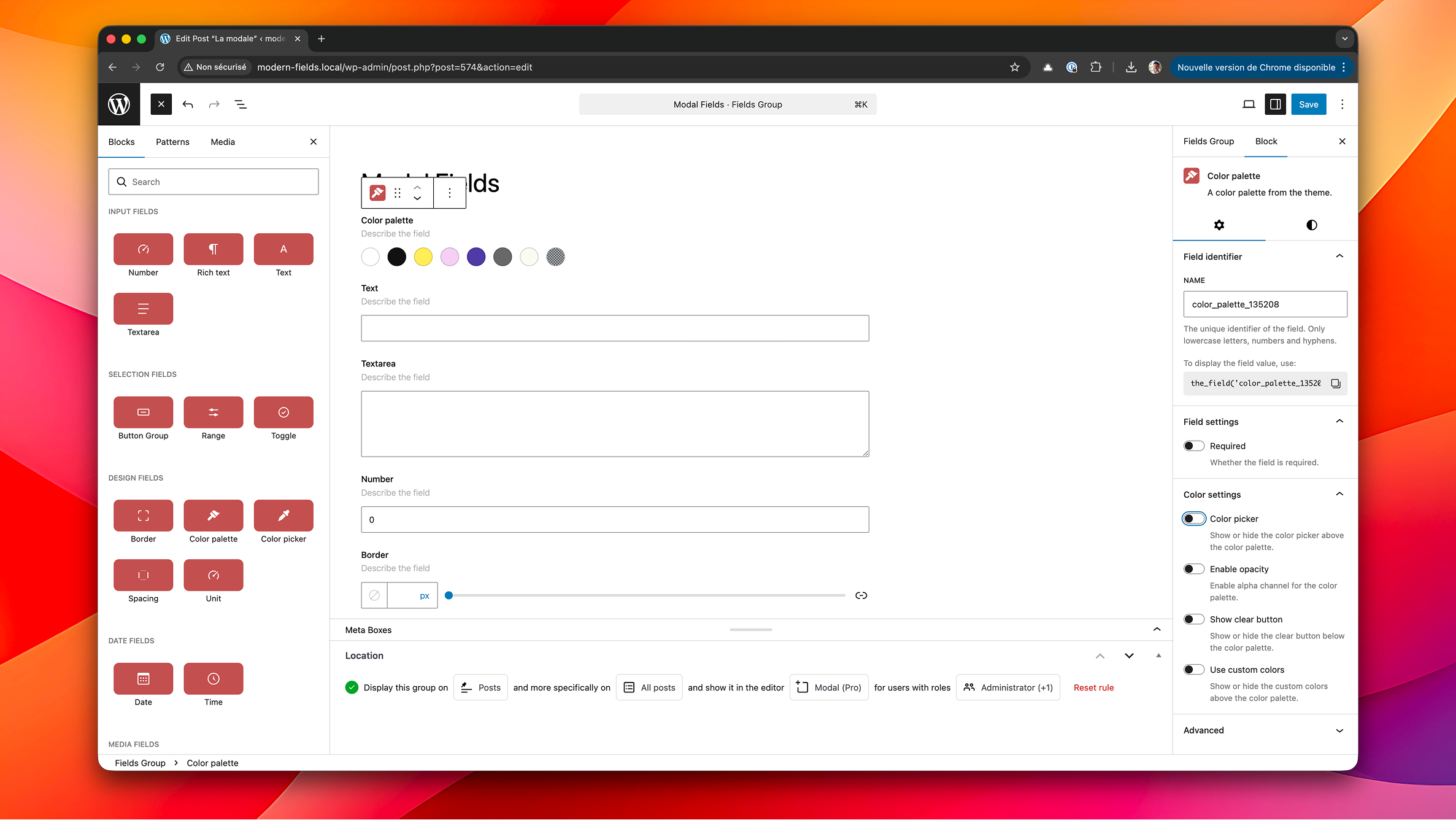
Modern Fields™ brings a visual field builder to the WordPress block editor without sacrificing flexibility.
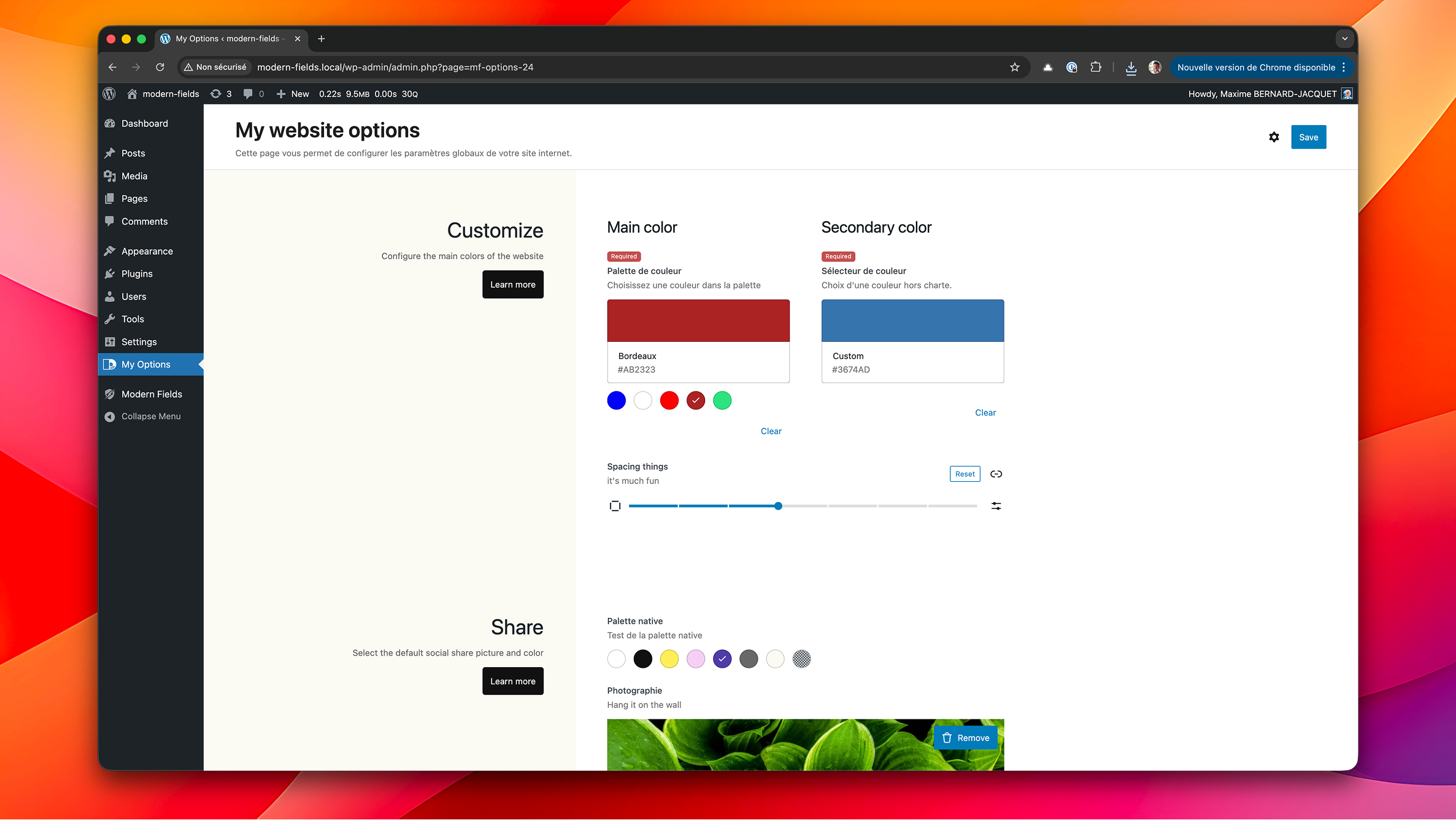
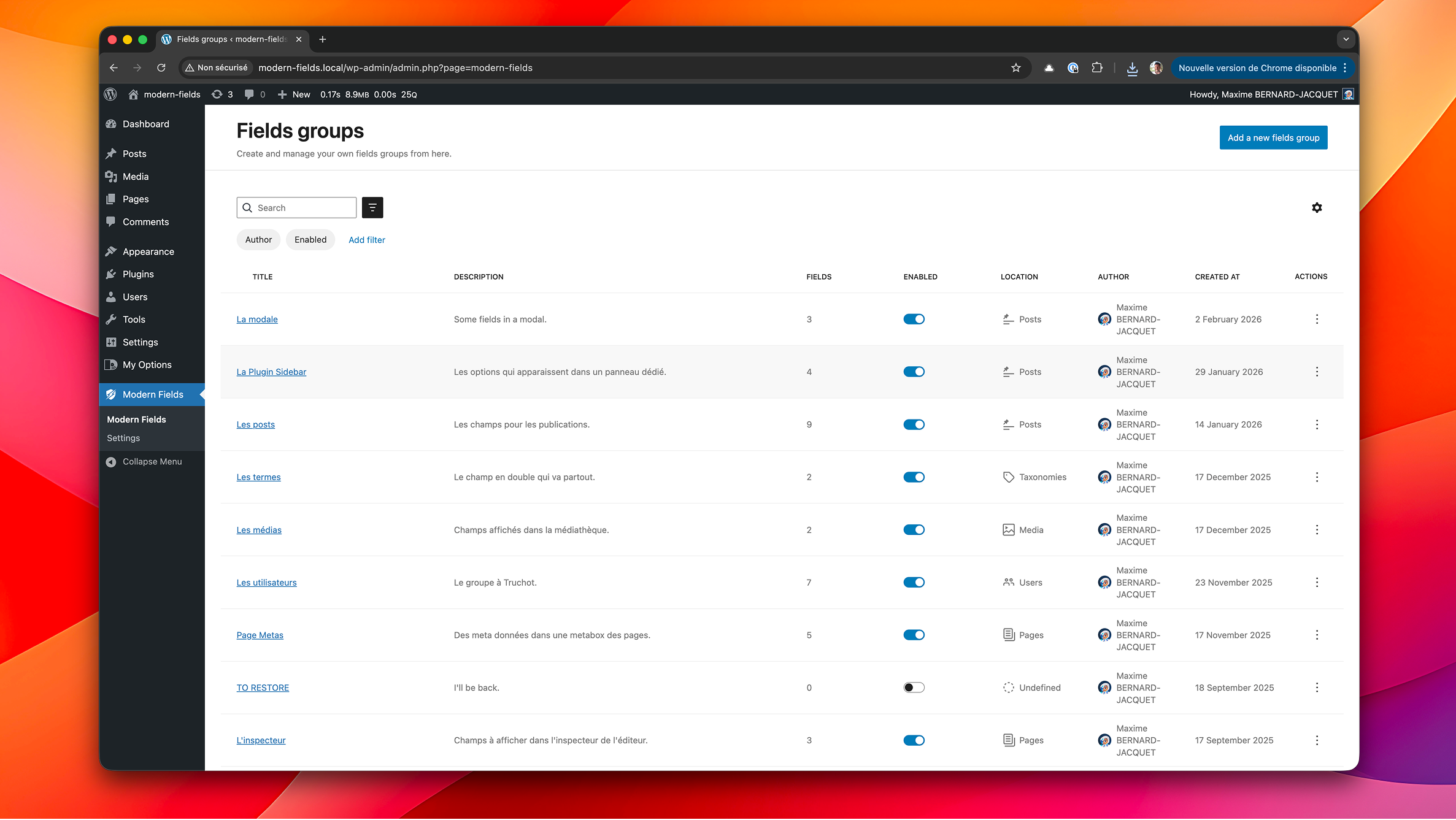
Create reusable field groups, assign them to posts, pages, custom post types, or options screens, and render them with purpose-built Gutenberg blocks & block bindings.
No code required! Everything is built with native WordPress APIs so it feels at home in your admin and keeps performance top of mind.
Highlights
- Build field groups visually with native WordPress UI components.
- Choose from a growing library of field blocks: text, textarea, toggle, number, range, button group, image, file, color picker, and more.
- Attach field groups to post types, page templates, or options screens with fine-grained location rules.
- Manage permissions with role-aware controls for who can edit or manage field groups.
- Output field data in templates with a specific meta bindings block.
What are the advantages of using Modern Fields rather than Advanced Custom Fields (ACF)?
✔ Native controls from the block Editor for a better experience
✔ Design field groups visually within the block editor
✔ Configure your fields more quickly
✔ More locations to display field groups (modal, panel)
✔ Ready-to-use patterns for stunning options pages
✔ Display fields in your template without code with the Field Value block, no need to code
✔ Use query block to filter results by meta
✔ And more to come in the premium version
Copyright & Trademark
“Modern Fields”™ and the Modern Fields logo are trademarks of Dysign.
Copyright © 2024–2026 Dysign. All rights reserved.
The plugin source code is licensed under the GNU General Public License v2 (or
later). That license does NOT grant any right to the “Modern Fields” name or
logo: they may not be used to identify, brand, or promote derivative or forked
products without prior written permission from Dysign.
Скриншоттор
Блоктор
This plugin provides 35 blocks.
- Field Value Display any value from a meta field. Brought to you by Modern Fields.
- Color Picker A custom color picker.
- Email A simple email input field.
- Icon Pick an icon from the WordPress icon library or the media library.
- Rich Text A rich text input field with formatting options.
- Unit Select a value with a unit.
- Image Import or select an image from the media library.
- Date A date / time input field.
- Select A select dropdown field with key/value options.
- Link Point anywhere: an external URL, or existing content found by searching.
- Spacing Select spacing values for the selected sides.
- Post Reference Point to a single post, page or custom post type.
- Map Pick a location on a map, or search for its address.
- File Import a file or select one from the media library.
- Conditional Logic Get Modern Fields Pro and unlock the Conditional logic block.
- Toggle A toggle On/Off field for boolean input.
- Button Group A button group field with multiple choices.
- Time A time input field.
- Color Palette A color palette from the theme.
- User Select one or several users, filtered by role.
- Post or Archive Link Link to a post or to a post type archive, always chosen from a list.
- Range A range input field.
- Checkboxes A checkboxes field for multiple boolean input.
- Embed Paste a link and preview what it embeds.
- Relationship Get Modern Fields Pro and unlock the Relationship field.
- Multi Token A mutli-value input field.
- Gallery Select several images at once and order them by drag and drop.
- Text A simple text input field.
- Radio Buttons A radio buttons field with multiple choices.
- Taxonomy Select terms from a taxonomy, and create new ones along the way.
- Block Editor Get Modern Fields Pro and unlock the Block Editor field.
- Repeater Get Modern Fields Pro and unlock the Repeater field.
- Textarea A textarea field for longer text input.
- Number A simple number input field.
- Border Configure border values.
Орнотуу
- Upload the plugin files to the
/wp-content/plugins/modern-fieldsdirectory, or install the plugin through the WordPress plugins screen directly. - Activate the plugin through the Plugins screen in WordPress.
- Navigate to Modern Fields Field Groups to create your first group and start adding field blocks.
- Assign your field group to the desired location and publish it.
- Edit a post or page that matches your rules to start filling in the fields.
- Use the Field value block to display a meta in your content or a template.
FAQ.KG
-
Does Modern Fields work with the Classic Editor?
-
Modern Fields is built specifically for Gutenberg but also works on classic editor through metaboxes.
-
How do I render field values on the frontend?
-
Use the Field value block to show any value from your fields from the current post, post author or options pages. No code required! It will bind the data to your templates automatically.
You can also use these functions in your custom blocks or template :the_field()orget_field() -
Can I limit who can manage field groups?
-
Yes. Permissions integrate with WordPress roles and capabilities. Only users with the appropriate capabilities can create or edit field groups.
Сын-пикирлер


Contributors & Developers
“Modern Fields, Custom Fields for Gutenberg” is open source software. The following people have contributed to this plugin.
Мүчөлөрү
“Modern Fields, Custom Fields for Gutenberg” has been translated into 1 locale. Thank you to the translators for their contributions.
Translate “Modern Fields, Custom Fields for Gutenberg” into your language.
Interested in development?
Browse the code, check out the SVN repository, or subscribe to the development log by RSS.
Өзгөртүүлөр
1.4.0
New:
- New Link field: point anywhere — an external URL, or existing content found by searching, using the link picker WordPress uses everywhere else
- Link field: choose whether the field asks for a link text, and whether it offers “Open in new tab”
- New Post or Archive Link field: link to a post or to a post type archive, always chosen from a list rather than typed in
- Post or Archive Link field: restrict the list to the post types, publication statuses and terms of your choice
- Post or Archive Link field: the archive of each post type is offered alongside individual entries, and can be turned off; several destinations can be allowed
- Both link fields display through a Button block, and read in templates with modern_fields_get_link()
- New Embed field: paste a link and preview what it embeds, right under the field
- New User field: pick one or several users, with their avatar in the search results
- User field: restrict the search to the roles of your choice, custom roles included
- New Post Reference field: point to a single post, page or custom post type through a searchable dropdown
- Post Reference field: restrict the search to the post types and the publication statuses of your choice
- Post Reference field: the new Bidirectional option records the reverse relation, so a post can be asked which posts point at it, read with modern_fields_get_linked_posts()
- New Taxonomy field: pick terms with the very interface WordPress uses — a checkbox tree for hierarchical taxonomies, a token field for flat ones
- Taxonomy field: choose the taxonomy to display, and allow missing terms to be created straight from the field
- New File field: import a file or pick one from the media library
- File field: restrict the media library to a category (images, documents, audio, video, archives) or to specific formats
- File field: set a maximum weight, capped by the server limit and shown next to the field
- New Map field: search for an address, click the map or drag the pin, and the coordinates, the address and its city, postcode and country are all stored
- Map field: the stored value uses the very same keys as ACF’s Google Map field, so a template moved over keeps working untouched
- Map field: set the default centre, the zoom, the height, the map type, a light or dark theme, and the colour of the pin
- Map field: the Google Maps API key is read from a wp-config constant or from the modern-fields/maps/api_key filter, never stored in the database
- Map field: without a key, the field still takes coordinates by hand and tells you which line to add where
- Map field: limit the address search to the countries of your choice, or turn the search off entirely
- Read a location in templates with get_field(), and link to it with the new modern_fields_get_map_url()
- New Icon field: pick an icon from the WordPress icon library, or upload one from the media library
- Icon field: the whole Dashicons set is published to the WordPress icon registry, so those icons render through the native Icon block, answer wp_get_icon() and appear in every picker that reads the registry
- Icon field: a plugin registering an icon collection of its own shows up in the picker with nothing to configure
- Icon field: the media library tab can be turned off, leaving only registered icons — the ones the native Icon block can display
- New Gallery field: pick several images at once from the media library, reorder them by dragging the thumbnails, and drop one with the cross that appears over it
- Gallery field: set a minimum and a maximum number of images, and the aspect ratio the thumbnails are cropped to
- Gallery field: the value is the ordered list of attachment IDs, read in templates with get_field()
- Field add-ons have one public entry point: window.modernFields.fields.registerFieldType, with window.modernFields.apiVersion beside it. A third-party field type registers its block and its component in a single call, and inherits the label, description, Required badge and settings panels of the native fields
Improved:
- Theme JSON sync: reading the field group status no longer scans the post type, taxonomy and block files along the way
- Theme JSON sync: a status that fails to load now says so instead of showing an empty column
- Every field’s settings moved to the block editor’s own settings panels: an option shows at a glance whether it has been changed, resets on its own, and the whole section resets at once
- Editor styles are collected once per stylesheet instead of once per field, so a group of a dozen fields no longer repeats the same CSS a dozen times in the metabox
- Click targets across the plugin are reachable from a keyboard, and what screen readers announce was named properly — the media field’s image preview, the checkbox lists, the rich text editor’s frame
Fixed:
- Fields storing a structure (Border, Spacing) lost their value when saved from a form rather than the block editor
- Checkbox lists with a capped height squashed their rows instead of scrolling
- Selections were lost when a search narrowed a list of checkboxes
- Role and status pickers now scroll instead of stretching on sites with many roles
- The Link field came up unstyled outside the block editor — on an options page, a term or a user form — because the stylesheet it needs was looked up in the rendered group content, where the marker it looks for no longer exists
1.3.0
New:
- New Dashboard location: display a field group as a widget on the WordPress dashboard. Values are saved as site options (administrators only)
- Field values are no longer publicly exposed in the REST API. Enable the new ‘Expose through API’ option per field to opt in
- Image field: choose the display ratio
Fixed:
- Filters and trash has been fixed in list views (Field groups, CPT, Taxonomies and blocks)
- Fixed a fatal error when editing a post whose author no longer exists or was never set (e.g. content created through WP-CLI or the API)
- Fixed a blank options page / dashboard widget when the group contains a checkboxes field that was never saved
- The field groups list now shows “No author” instead of an empty cell for groups without an author
1.2.0
New:
* Field groups are now available in WooCommerce products & post types with classic editor
* New filters to change the value returned by getField(): modern-fields/get_field/valueand modern-fields/get_field/name=field-name
* Expose render API to prepare for add-ons
Improved:
* Improved RichText field styles in narrow area + color and link dropdowns
Fixed:
* Fixed binding meta to a button in Field value block
1.1.0
New:
* The whole Modern Fields admin is now a single-page app: switching between Field Groups, Post Types, Taxonomies, Blocks, Import/Export and Settings no longer reloads the page.
* Trash support: move field groups, post types and taxonomies to the trash, restore them, or delete them permanently, with an Active/Trash filter in each list.
Improved:
* Validation notices now appear at the bottom-center of the screen, matching WordPress 7.0.
* Cleaner empty states in the admin lists (column headers are hidden when a list has no items).
* Main menu without icons on small screens (< 1024px) for a tidier layout.
Fixed:
* Fixed regression with field name not being slugified, causing some fields to not be displayed.
* Fixed issues with groups locations not correctly displayed
* Fixed inconsistencies with the Modern Fields admin menu.
* Fixed scroll issues in the Post Types, Taxonomies and Blocks pages.
* Fixed an error shown on a field group with no fields yet.
* Fixed links to Post Types, Taxonomies, Blocks and field groups after the single-page rework.
* Fixed a crash in the location picker when a post or page has no title.
* Fixed saving Settings when a palette color was added without picking a color.
* Fixed inconsistencies with Modern Fields admin menu
* Fixed scroll issues in CPT, taxonomies and blocks pages
* Fixed main menu on small screens
* Fixed error on empty field group
1.0.4
- Prepare for Modern Fields premium version release
- Fixed an issue with Custom Post Types: private with show_ui=true are now showing in the list
- Fixed issues where Modern Fields was overriding some theme.json defaults
- Some code optimization
1.0.3
- Fix: native blocks (like Group) no longer lose their color and typography options in the post/page editor when the plugin is active.
- Fixed row selection when clicking the title or toggle in the field groups list (Dataview).
- Fixed image block styles inside field locations.
- Moved the menu below the header for clearer navigation.
- Metabox accordions are now handled natively.
1.0.2
- New: duplicate field group from the groups list
- New: filter
modern-fields/permissionsto change the minimum role permission to acces the plugin - Added connectors with the Pro version
- Improved some styles for WordPress 7.0
- Improved the date time field according to choosen format
- Improved the RichText field to avoid issues in the block editor
- Improved group list table (DataViews)
- Improved: specific specific posts & pages selector now shows draft and pending posts
- Harmonized the filters names
- Fixed meta label in block bindings
- Fixed a crash when saving settings
- Fixed fields label and description encoding
- Fixed default values nto showing in some cases
1.0.1
- New: added import and export via WP CLI
- Fixed an issue with scripts loaded outside the plugin pages
- Fixed image binding in Field value block
- Fixed issue with default CPT icon
- Fixed an issue with display mode option in select field
- Fixed an issue where default fields values didn’t showed up
- Fixed admin menu appearing in options pages when it shouldn’t
- Fixed a bug on location selector when invalid location is set
1.0.0
- Official stable release!
- Removed beta features
- Fixed issue with locations in CPT
- Stability improvements & bug fixes
0.9.1
- New: JSON sync for Custom Post Types and Taxonomies with the theme
0.9.0
- New: Register Custom Post Types and Taxonomies from the admin
- New: Navigation menu between Modern Fields sections
0.8.0
- New: import / export groups in JSON
- New: Sync fields with your theme in /mf-json/ folder
0.7.3
- Added an onboarding popup when creating your first field group
- Usual roles are pre-selected in location selector
- Fixed duplicate colors in palette field
- Fixed RichText overflow in narrow area like inspector
- Fixed inspector area width
- Fixed image binding with the field value block
0.7.2
- Fixed vendor prefixing on composer dependencies
0.7.1
- Fixed an error with user name in fields list
- Fixed a potential conflict with the fields blocks and third party blocks
- Fixed duplicate fields has different unique ids now
- Fixed default color palette in Modern Fields settings
0.7
- New image field option: compact UI
- Fixed color picker when there are custom colors set in appearance
- Fixed missing translations in JavaScript
0.6
- New fields: checkboxes, radio, select/combobox, multi token and email
- More reliable field data structure
0.5.5
- Fixed deployment with PHP dependencies
0.5.2
- Added wp.org assets
0.5.1
- First deploy
0.5.0
- Initial beta release.