

Сүрөттөө
PGO Simple UTM Tracker helps WooCommerce store owners understand which campaigns generate orders.
It captures utm_source, utm_medium, utm_campaign, utm_term, utm_content, gclid, fbclid, msclkid, and ttclid. Attribution is kept in a secure first-party cookie and added to the WooCommerce order when the customer completes checkout.
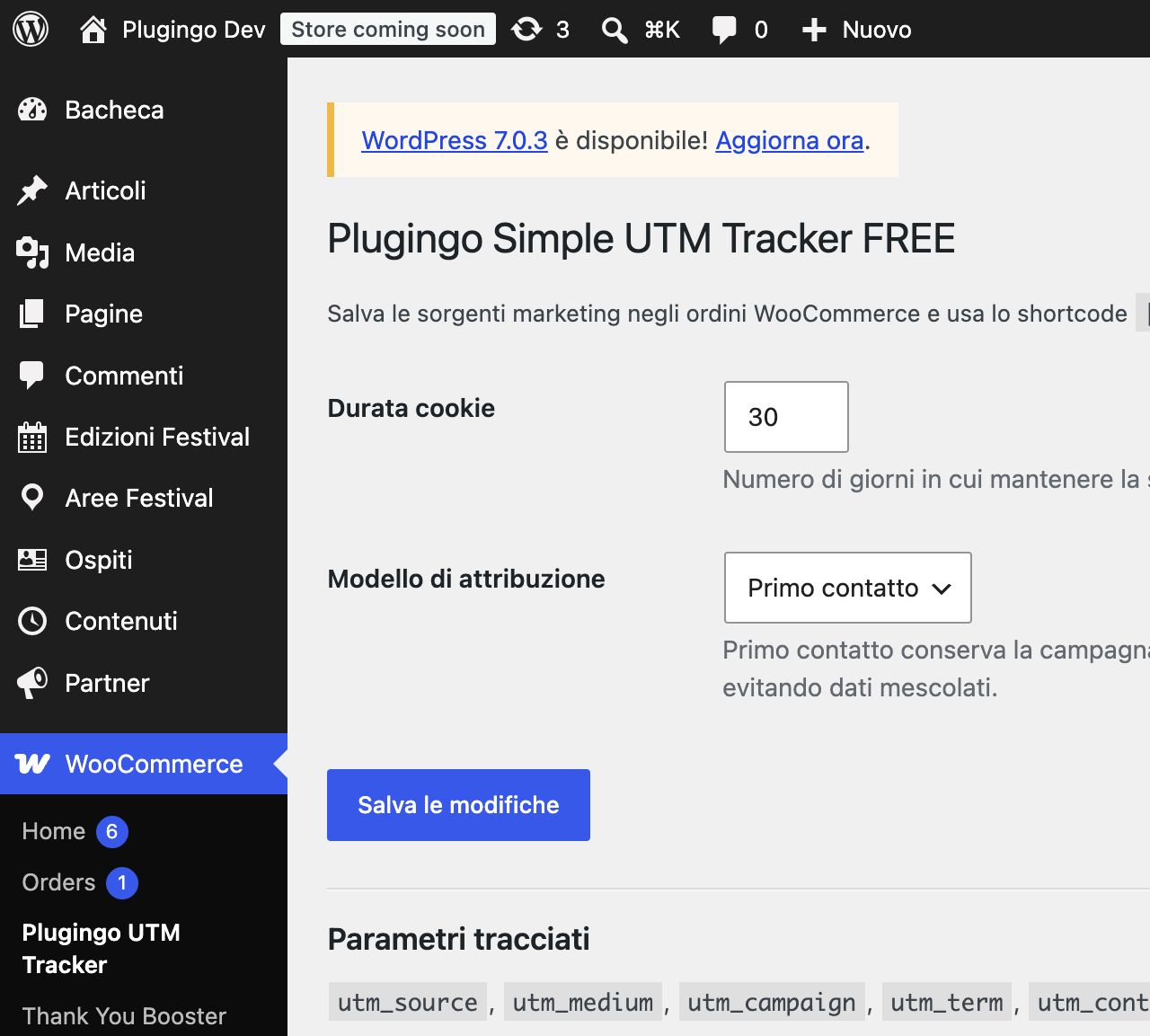
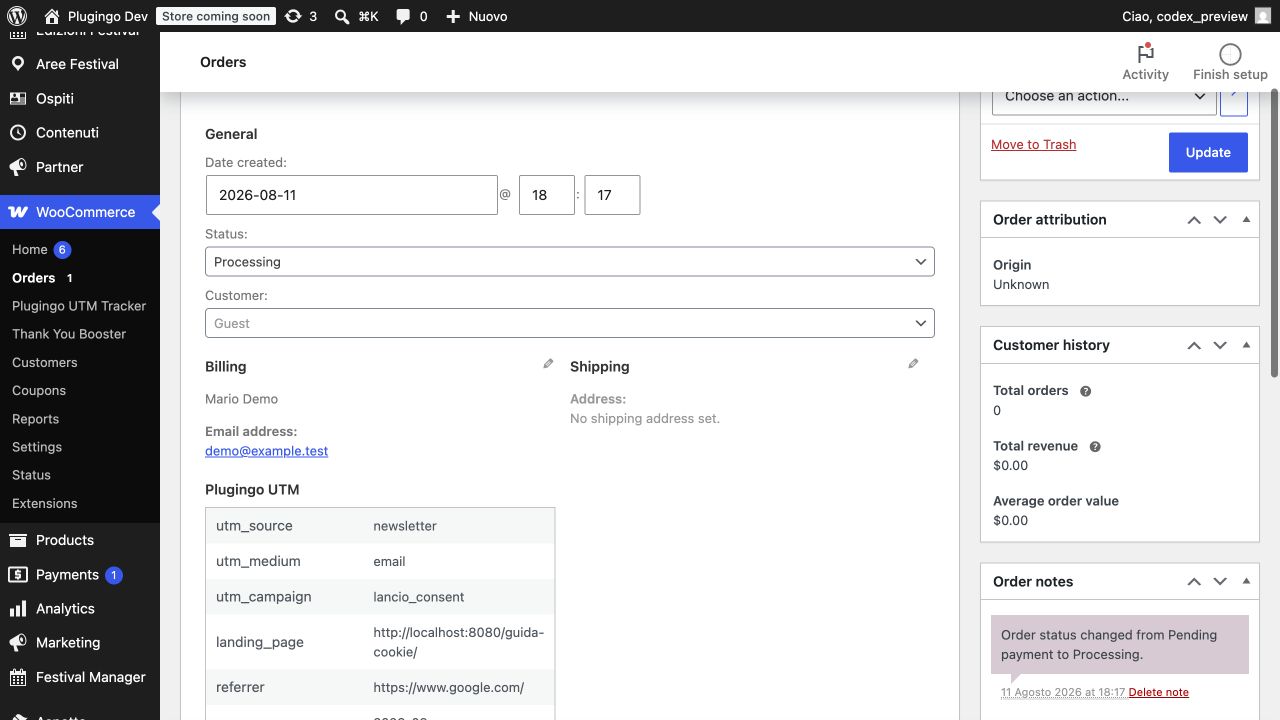
Choose between first-touch and last-touch attribution. View the source directly in both the classic WooCommerce order screen and the High-Performance Order Storage (HPOS) interface.
The [plugingo_utm_fields] shortcode outputs hidden attribution fields for HTML-compatible forms. Contact Form 7 submissions can also receive the captured fields.
Privacy-first attribution
The recommended consent mode integrates with the WordPress Consent API and captures data only when the visitor has granted statistics consent through a compatible consent solution. An alternative site-managed mode is available for sites that already block the tracker until consent is granted.
The plugin does not contact external services. Attribution data remains on your WordPress installation. Landing pages are stored without query strings, values are limited to 255 characters, and the first-party cookie is HTTP-only, Secure on HTTPS sites, and SameSite=Lax.
Site owners are responsible for describing attribution tracking in their privacy and cookie notices and for selecting a consent mode appropriate to their jurisdiction.
Features
- First-party UTM and click-ID attribution
- WordPress Consent API support
- First-touch or last-touch model
- WooCommerce order metadata
- Classic order and HPOS compatibility
- UTM column in the order list
- Detailed attribution panel on each order
- Hidden-field shortcode for compatible forms
- Contact Form 7 integration
- No external services or remote requests
Upgrade to PGO UTM Tracker PRO
If the FREE edition proves useful, PGO UTM Tracker PRO adds simultaneous first- and last-touch journeys, revenue dashboards, campaign/product/coupon reports, CSV export, a campaign URL builder, and weekly email summaries. The PRO edition is available from Plugingo.it and is also included in Plugingo PASS.
FREE and PRO cannot run simultaneously. Activating PRO automatically deactivates FREE; activating FREE automatically deactivates PRO. Existing attribution settings and WooCommerce order metadata remain compatible.
Скриншоттор
Орнотуу
- Install and activate PGO Simple UTM Tracker.
- Open WooCommerce > PGO UTM Tracker.
- Select the consent mode used by your site.
- Choose first-touch or last-touch attribution and the cookie duration.
- Visit a campaign URL containing UTM parameters after granting statistics consent.
- Complete a test order and review its attribution details.
FAQ.KG
-
Does the plugin send data to Plugingo or another service?
-
No. It makes no remote requests. All attribution data remains in the visitor’s first-party cookie and in your WooCommerce order database.
-
Does it require WooCommerce?
-
Yes. WooCommerce is declared as a plugin dependency because order attribution is the primary feature.
-
What happens before statistics consent is granted?
-
In the recommended WordPress Consent API mode, no campaign parameters are captured and no attribution cookie is created.
-
Which consent plugins are compatible?
-
Any consent solution that exposes the standard WordPress Consent API and updates the
statisticsconsent category can be used. -
Can I integrate a custom consent system?
-
Yes. Select site-managed mode only when your implementation prevents tracking before consent. Developers can also use the
plugingo_utm_tracker_tracking_allowedfilter to return the current consent state. -
Does it support HPOS?
-
Yes. The plugin supports WooCommerce High-Performance Order Storage and the classic order interface.
-
Is there a PRO version?
-
Yes. PGO UTM Tracker PRO is available at https://plugingo.it/pgo-utm-tracker-pro/ and is included in Plugingo PASS. It contains every FREE feature plus multi-touch journeys and advanced local reports.
-
Can FREE and PRO be active together?
-
No. They provide the same base attribution engine, so activating one edition automatically deactivates the other to prevent duplicate tracking.
Сын-пикирлер
There are no reviews for this plugin.
Contributors & Developers
“PGO Simple UTM Tracker” is open source software. The following people have contributed to this plugin.
Мүчөлөрү
Translate “PGO Simple UTM Tracker” into your language.
Interested in development?
Browse the code, check out the SVN repository, or subscribe to the development log by RSS.
Өзгөртүүлөр
1.2.2
- Added a responsive Plugingo-branded settings experience.
- Added contextual documentation, support, and FREE versus PRO comparison links.
- Improved and fully internationalized settings-page copy.
- Added safe mutual exclusion between the FREE and PRO editions.
1.2.1
- Updated the canonical plugin URI to the working Plugingo.it product page.
- Updated the WordPress.org contributor username.
1.2.0
- Prepared the plugin for the WordPress.org Plugin Directory.
- Added WordPress Consent API support and a site-managed consent mode.
- Added complete privacy documentation and English directory documentation.
- Improved input validation for public campaign parameters, cookies, and request paths.
- Updated the public name to PGO Simple UTM Tracker.
1.1.0
- Added first-touch and last-touch attribution models.
- Prevented parameters from separate campaigns from being mixed.
- Added HPOS order-list compatibility.
- Minimized stored data by using an HTTP-only cookie and removing query strings from landing pages.
- Declared the WooCommerce dependency.
1.0.0
- Initial release.