

Сүрөттөө
System Markdown Alternate publishes a clean, machine-readable Markdown representation of your content. Append .md to any supported permalink and you get YAML front matter plus the post body converted to Markdown — with marketing clutter, forms and navigation widgets stripped out.
https://example.com/my-post/    → HTML
https://example.com/my-post.md  → Markdown (front matter + content)
It is built for the era of AI assistants, agents and technical scrapers that prefer plain Markdown over rendered HTML. It is not a generic SEO plugin.
Read the full documentation — installation, every setting in the panel, the endpoints, the shortcodes, the integrations and troubleshooting.
Key features
.mdendpoint for every supported, published, public post.- Content negotiation: the same Markdown is returned for
Accept: text/markdownor?format=markdownrequests. TheAcceptheader is parsed with q-values, so a client that prefers HTML (higher q) still gets HTML. Vary: Accepton negotiable URLs, so caches and CDNs that honour it keep the HTML and Markdown representations of the same address apart. Because some page caches key by URL only and ignoreVary, the negotiated Markdown (and406) responses are also sent non-cacheable, so safety never depends onVaryalone.- Markdown discovery in HTML and HTTP: supported canonical pages advertise the representation with both
<link rel="alternate" type="text/markdown">in the document head and a typedLink: rel="alternate"response header. The HTTP form is also available toHEADrequests. - Correct HTTP headers:
Content-Type: text/markdown,X-Robots-Tag(defaultnoindex, follow) and aLink: rel="canonical"back to the HTML. - Clean conversion: Gutenberg blocks are rendered individually (no injected related/CTA blocks), excluded blocks/shortcodes/CSS classes are removed, code blocks become fenced blocks, URLs are made absolute, and an embedded video, tweet or track leaves a link to what it embeds rather than an empty gap. Clickable link cards keep their name too: the invisible overlay link such cards are built from takes the name the markup declares, instead of arriving with no text at all.
/llms.txtendpoint (optional): an index of your content for LLMs and AI agents. An optional enriched mode (off by default) adds a site summary, a curated “Key content” section, a description for each entry and anOptionalsection for older posts. Another optional toggle appends the last modified date (updated: YYYY-MM-DD) to every entry, so crawlers can spot changed content without re-fetching each URL.- Custom taxonomies in the front matter (optional, nothing selected by default): tick the taxonomies you want and their terms are added as a
taxonomies:block, alphabetically ordered. Nothing is ever published automatically: a taxonomy registered by another plugin appears in the panel unticked, and taxonomies with no public term archive are labelled as internal. - Extra custom fields (optional, empty by default): list the post meta keys whose values belong in the document and they are appended to the body. One setting covers ACF, JetEngine, Meta Box and WordPress’s own Custom Fields box, because underneath they all store post meta — so a page whose text comes partly from a template’s fields is no longer published half missing. Nothing is detected automatically, and posts without the field keep their document and their cache validator untouched.
- Object cache with proactive invalidation on post edit, plugin update and settings change: a persistent object cache is used when one is available, falling back to transients otherwise.
- Optional
.mdhit counter (off by default): counts how many times the Markdown endpoint is served, split bot vs human. Privacy by design: only aggregate daily totals are stored — no IP addresses, no user-agent strings, no per-visitor data, no cookies, no external calls. - Bricks pages get a real
.md: rendered through Bricks’ own API (never re-implemented), with the same excluded-shortcode/excluded-class rules as everything else, plus a new “excluded builder elements” list for Bricks chrome (forms, nav menus, share bars, tables of contents, breadcrumbs). A post switched back to Render with WordPress is unaffected. Detection is per post, never per post type: a site that builds its pages with Bricks while its articles stay in the ordinary editor keeps every one of those articles. - Other page builders are handled honestly: a post rendered by Elementor, Divi, WPBakery, Oxygen, Beaver Builder or Breakdance has no Markdown representation — its content is not in
post_content, or is there as the builder’s own layout shortcodes — so it returns 404 instead of an empty or misleading document, and it stays out of/llms.txt, the alternate links and the shortcodes. - Admin panel to choose which post types are exposed and to tune cache, exclusions and headers — no post type is exposed until you pick one. Each type shows what its published posts are actually built with (for example 12 Bricks, 3 Gutenberg), so a page builder that costs you the Markdown version is visible before it surprises you.
- Shortcodes
[sysmda_md_url](the Markdown URL),[sysmda_md_download](a bare download link), and[sysmda_md_actions](an opt-in Copy as Markdown split button with copy, new-tab view and download actions). - Optional integrations, shown only when the related plugin is active:
- Advanced Custom Fields: add a subtitle and a TL;DR (from ACF fields) as a preamble between the H1 and the body.
- GenerateBlocks 2.x: a
{{sysmda_md_url}}Dynamic Tag, available automatically, usable in element fields (e.g. a Button URL).
- Developer-extensible: every behaviour above — which content is served, the headers, the caching, the conversion pipeline, the front matter and
/llms.txt— is exposed as a WordPress filter. See the FAQ below for examples and a link to the full documented list.
Скриншоттор
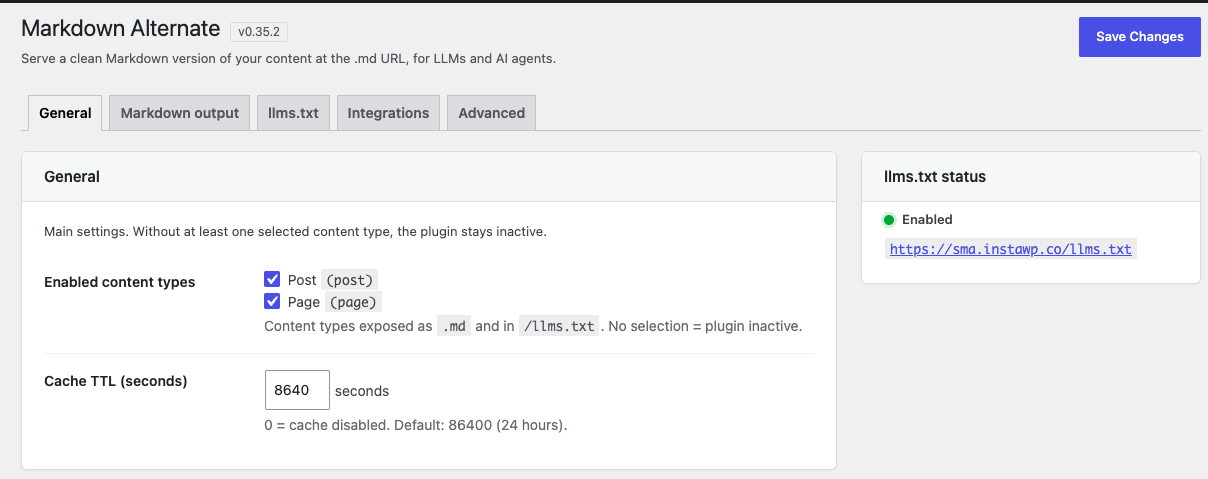
.md (nothing is served until at least one is ticked) and set the cache TTL. The sidebar reports the /llms.txt status at a glance.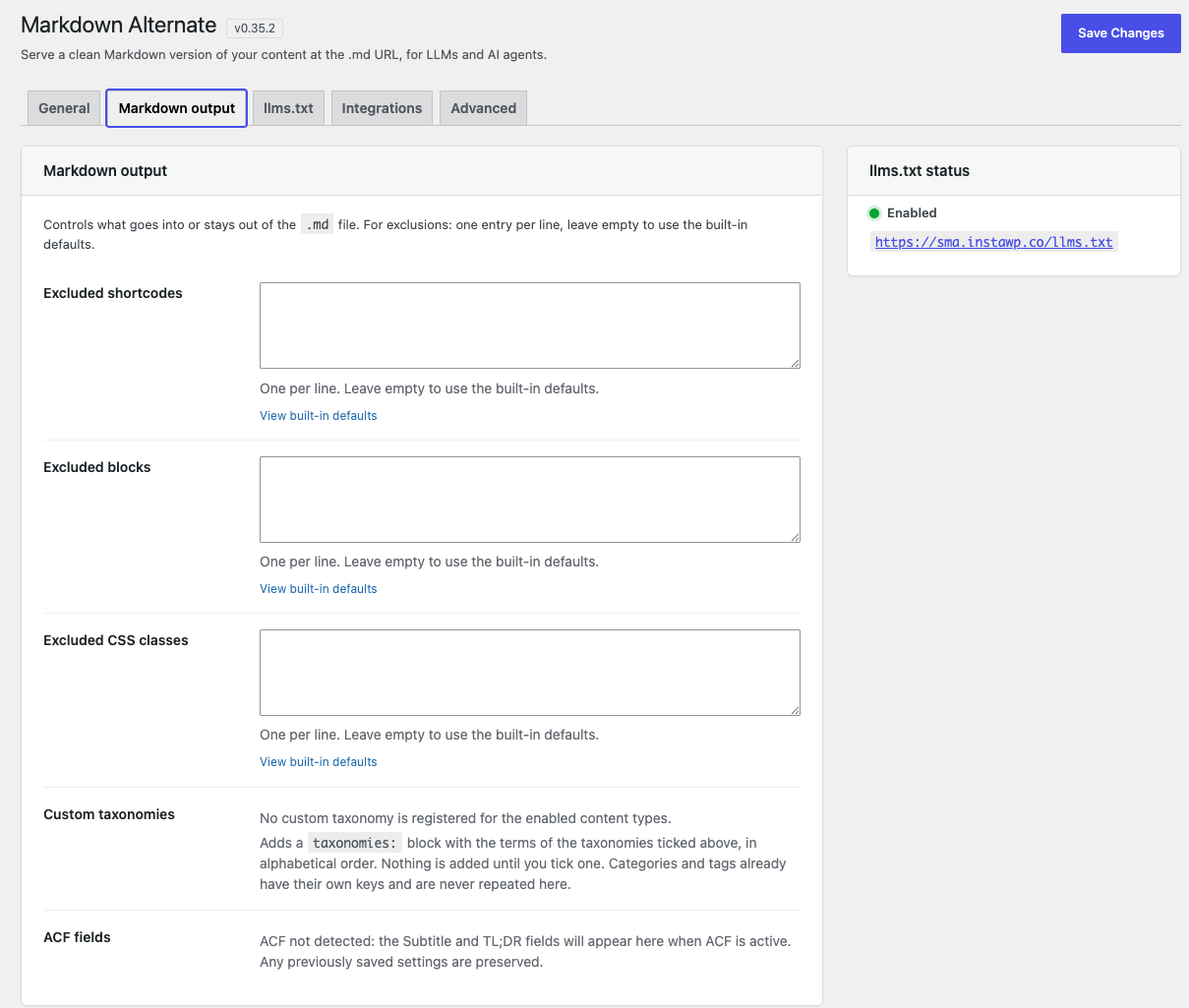
.md. Excluded shortcodes, blocks and CSS classes (leave empty for the built-in defaults), plus the custom taxonomies added to the front matter and the ACF fields.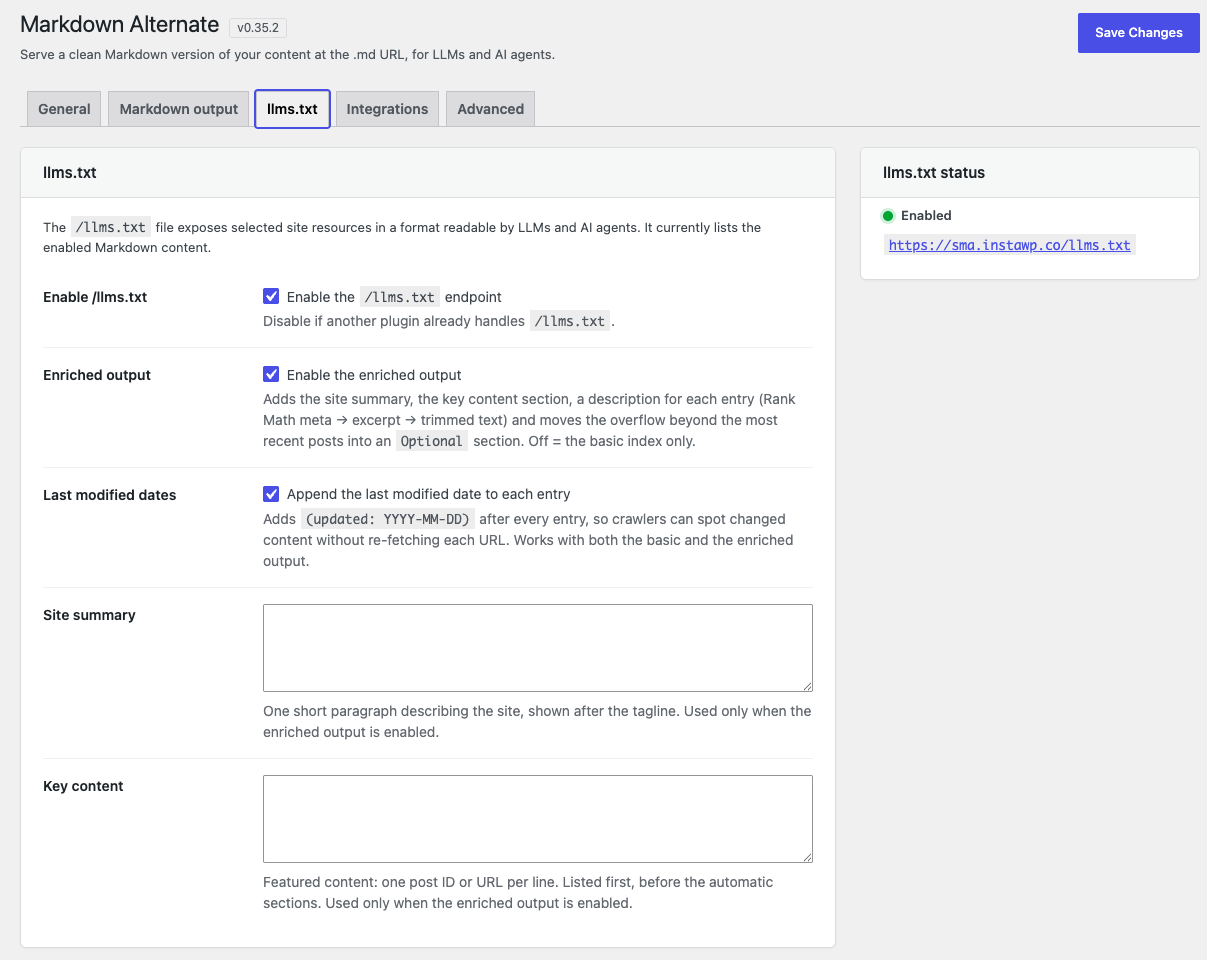
![Settings — Integrations: the [sysmda_md_url], [sysmda_md_download] and [sysmda_md_actions] shortcodes, with the GenerateBlocks and ACF detection status.](https://ps.w.org/system-markdown-alternate/assets/screenshot-4.png?rev=3639207)
[sysmda_md_url], [sysmda_md_download] and [sysmda_md_actions] shortcodes, with the GenerateBlocks and ACF detection status.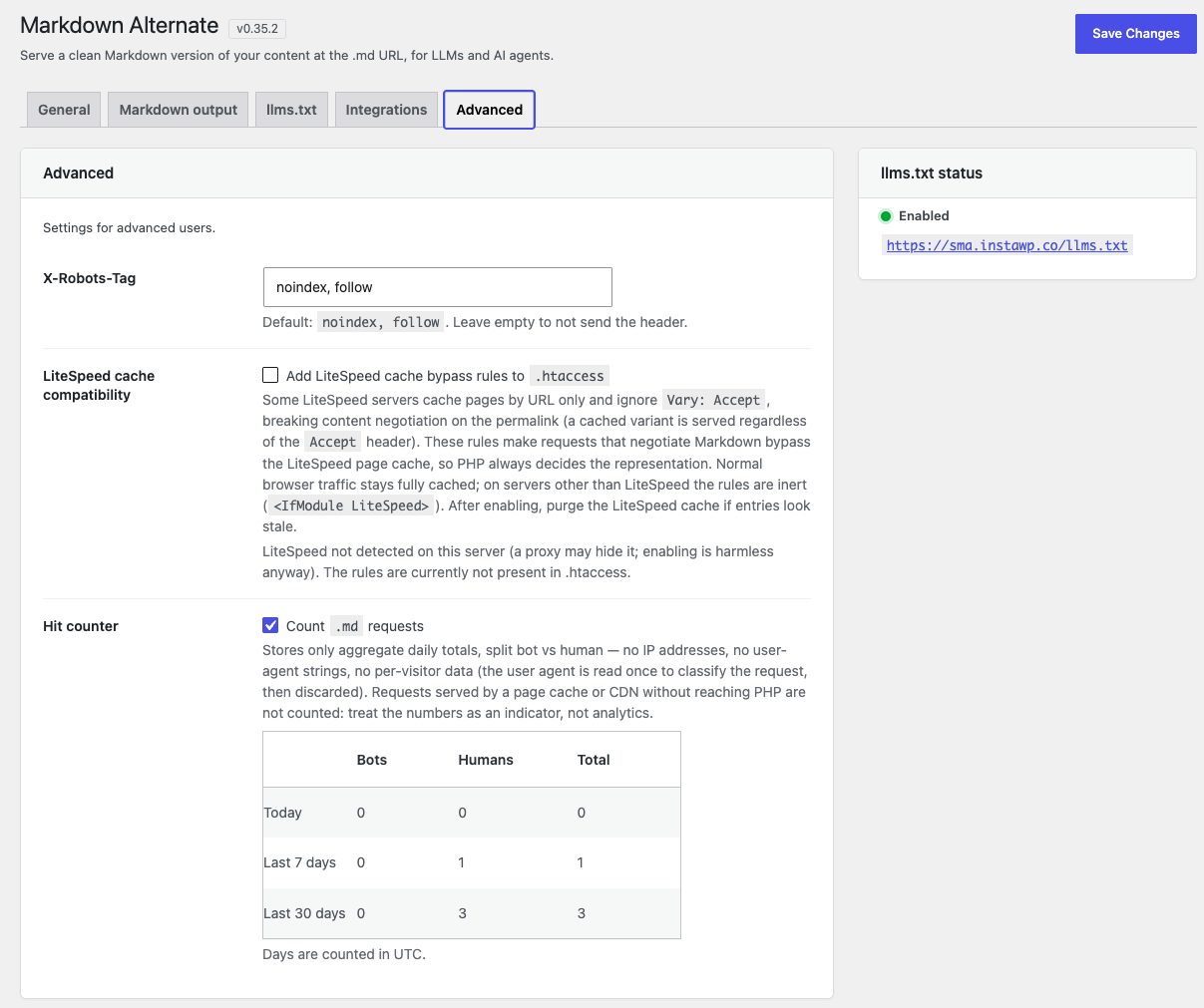
X-Robots-Tag header, the opt-in LiteSpeed cache bypass rules and the .md hit counter, split bot vs human.Орнотуу
- Upload the plugin to
/wp-content/plugins/or install it through the Plugins screen in WordPress. - Activate the plugin.
- Go to Settings Markdown Alternate and select at least one post type under Supported post types. Until you do, the plugin stays inactive.
- Visit any supported post and append
.mdto its URL.
No rewrite rules are added, so no permalink flush is required.
FAQ.KG
-
Why is nothing served at the .md URL?
-
By default no post type is enabled. Open Settings Markdown Alternate and tick at least one post type under Supported post types.
-
Which content does NOT get a .md version?
-
Anything the endpoint would not be able to serve honestly:
- content types not enabled in the settings page;
- drafts, pending and private content, and password-protected posts;
- media attachments (always excluded);
- posts with a non-standard post format — aside, status, quote, link, gallery, image, video, audio, chat. These are short snippets, usually untitled, with no editorial body worth serving as a document. Use the
sysmda_markdown_excluded_post_formatsfilter to change that; - posts rendered by an unsupported page builder — Elementor, Divi, WPBakery, Oxygen, Beaver Builder or Breakdance. Their content is stored outside
post_content, or stored in it as the builder’s own layout shortcodes, so the Markdown would come out either empty or full of layout wrappers converted as prose. A 404 is the honest answer; use thesysmda_markdown_unsupported_buildersfilter if you would rather have the empty document. Bricks pages are supported and get a real.md, rendered through Bricks’ own API — see the next question.
That last rule is decided per post, from the builder’s own render mode. Activating a builder does not affect posts you did not build with it, and a post you switched back to the WordPress editor keeps its Markdown version even though the builder data is still stored. Nothing is read from the post content, so an article quoting
[et_pb_section]in a code sample is not mistaken for a Divi page. -
How does the Bricks `.md` work?
-
The
.mdis built by calling Bricks’ own\Bricks\Frontend::render_data()on the page’s stored element tree — the plugin never re-implements Bricks’ elements. The existingmd-excludeCSS class already works on any Bricks element (set it in the element’s CSS Classes field); a new Excluded builder elements list under Settings Markdown Alternate Markdown output additionally strips Bricks chrome by default — forms, nav menus, share bars, tables of contents, breadcrumbs — the same way excluded CSS classes are stripped, and it only adds to that list, never replaces it. A page switched to Render with WordPress is served frompost_contentas usual, whether or not Bricks data is still stored on it.Markdown is also never served for URL variants of a post — its feed, its oEmbed view, its trackback endpoint, paged comments and the sub-pages of a post split with
<!--nextpage-->— even withAccept: text/markdown. Only the canonical permalink and its.mdURL return Markdown. -
What does the Markdown output look like?
-
Each
.mdresponse is a UTF-8 document with a YAML front-matter block (title, URL, Markdown URL, published/modified dates, and — when available — author, featured image, categories, tags and a description), followed by the# Titleheading and the post body converted to clean Markdown. The exact keys, their order and the escaping rules are documented as a stable contract, with conformance tests, in the Markdown output format reference. -
Can I include my custom taxonomies?
-
Yes. Open Settings Markdown Alternate Markdown output and tick the ones you want under Custom taxonomies: the front matter then carries a
taxonomies:block with their terms, sorted alphabetically. Categories and tags already have their own keys and are not repeated.Nothing is selected by default and nothing is ever added implicitly — a taxonomy registered by a plugin you install later shows up in the list unticked, so it cannot start publishing itself. Taxonomies used for editorial classification only, with no public term archive (“publicly queryable” off), are labelled as internal in the list: they are still selectable, but only on purpose. Developers can curate the list further with the
sysmda_front_matter_taxonomy_slugsfilter. -
How do I exclude part of a post from the Markdown?
-
Add one of the CSS classes
no-md,md-excludeorexclude-from-markdownto a block; the element (and its children) is removed from the Markdown output. You can customize the list with thesysmda_markdown_excluded_classesfilter. -
Does it affect my SEO?
-
The
.mdresponses are sent withX-Robots-Tag: noindex, followand aLink: rel="canonical"header pointing back to the HTML version, so search engines are told to prefer the original page. -
Use the
[sysmda_md_url]shortcode. If you run GenerateBlocks 2.x, the{{sysmda_md_url}}Dynamic Tag is available automatically — use it in element fields such as a Button URL. When the post has no.md, the tag resolves to an empty value so GenerateBlocks can hide the element instead of leaving a broken link. -
How do I add Copy as Markdown actions for readers?
-
Use
[sysmda_md_actions]. It renders a GitHub-style split button: the main action copies the complete Markdown document, while the dropdown offers Copy as Markdown, View as Markdown in a new tab and Download Markdown. Use[sysmda_md_actions id="123"]for a specific post.The component renders only where the shortcode is placed. Its small stylesheet and dependency-free script are loaded only on pages that actually render it, including placements in templates, widgets and secondary loops. The menu opens aligned to the button and drops below it, moving to the opposite side or above only when the screen edge leaves no room.
Like the other shortcodes, it outputs nothing when the target post has no Markdown version.
-
How do I let readers download the .md instead of opening it?
-
Use the
[sysmda_md_download]shortcode. It prints a link that saves the file:[sysmda_md_download] [sysmda_md_download text="Save the Markdown"] [sysmda_md_download id="123"]The link carries the HTML
downloadattribute, which is what tells the browser to save the file instead of displaying it. The file name comes from the post slug. Nothing changes on the server side: the.mdURL itself behaves exactly as it always has, so opening it directly still shows whatever your browser normally does with a Markdown file.The shortcode outputs a plain link with a single
sysmda-md-downloadclass, and the plugin loads no CSS and no JavaScript on your site for it. Any styling is your theme’s job.Like
[sysmda_md_url], it outputs nothing when the post has no Markdown version, so it can never produce a link to a 404. -
Is the .md content cached?
-
Yes (default 24h). It uses a persistent object cache when one is available and falls back to transients otherwise. The cache is regenerated automatically when the post is edited, when the plugin is updated, or when you save the settings — and also when something outside the post changes what the Markdown says: a synced pattern, the featured image, the description, an ACF field, the author’s display name, the permalink structure or the site address.
That is the cache inside WordPress. Caches outside it — your browser, a page cache, Varnish, a CDN — are told
Cache-Control: public, max-age=0, must-revalidate: they may keep a copy, but they must ask the site whether it is still current before serving it, and the answer is a small304 Not Modifiedwhen nothing changed. So a.mdcannot keep circulating after you edit the article, without depending on anyone purging it — which matters, because page caches purge the article’s URL and do not know its.mdversion exists. If your infrastructure has its own purge mechanism and you would rather trade that guarantee for raw speed, thesysmda_cache_controlfilter lets you set a real lifetime. -
Can I customize the plugin from my own code?
-
Yes: the plugin is developer-extensible through WordPress filters — which content is served, the HTTP headers, the caching, every stage of the conversion pipeline, the front matter and
/llms.txtcan all be changed from a theme or a site plugin. A few examples:add_filter( 'sysmda_markdown_output', fn( $md, $post ) => $md . "\n---\nCustom footer.\n", 10, 2 ); add_filter( 'sysmda_markdown_excluded_classes', fn( $classes ) => array_merge( $classes, array( 'my-private-block' ) ) ); add_filter( 'sysmda_llms_txt_enriched', '__return_true' );Every filter, with its default value, what changing it does and how much compatibility it promises, is documented here: Developer extension API. Hooks are labelled Stable or Advanced: the Advanced ones are supported and documented, but may still evolve while the plugin is pre-1.0. The Markdown output format itself is a separate, stronger contract.
-
Content negotiation misbehaves behind LiteSpeed cache. What can I do?
-
Some LiteSpeed cache configurations key the page cache by URL only and ignore
Vary: Accept, so a cached representation can be served regardless of theAcceptheader. The plugin already tells the cache not to store the negotiated Markdown; if requests for Markdown on the permalink still receive cached HTML, enable LiteSpeed cache compatibility in Settings Markdown Alternate Advanced: it adds.htaccessrules that make Markdown-negotiating requests bypass the LiteSpeed page cache (normal browser traffic stays cached; on other servers the rules are inert). Then purge the LiteSpeed cache. The explicit.mdURLs are not affected and remain fully cacheable.Not sure whether your host is affected? Whether a LiteSpeed server honours
Vary: Acceptdepends on the host and cannot be detected automatically, so if in doubt simply enable the option: it is the safe choice, and on hosts that already behave correctly the rules are just redundant. To test it yourself: open a post in a normal browser first (so its HTML gets cached), then request the same permalink with a Markdown Accept header, for example:curl -A "Mozilla/5.0" -H "Accept: text/markdown" https://example.com/my-post/If the response is HTML (often with an
x-litespeed-cache: hitheader) instead of Markdown, your server ignoresVary: Acceptand you need the option. The browser-like-Avalue matters: a WAF/CDN may block non-browser user agents. -
Does it work behind a CDN (Cloudflare, Fastly, Varnish)?
-
The
.mdURLs need nothing from you. The negotiated permalink depends on your CDN, and the difference matters:- the dedicated
.mdURLs are their own cache key — one URL, one representation, nothing to mix up. Any CDN may store them, andCache-Control: public, max-age=0, must-revalidatemeans it must revalidate before reuse, which is a cheap304 Not Modifiedwhen nothing changed. This route works everywhere, with no configuration; - the negotiated permalink (
Accept: text/markdownon the HTML page’s own URL) is sentno-store, so a Markdown response is never stored and can never be handed to a browser that asked for HTML. That closes the harmful direction, but it cannot fix the opposite one: if your CDN caches the HTML page by URL and ignoresVary: Accept, a later Markdown request is answered at the edge, PHP never runs, and the client simply gets HTML.Vary: Acceptis sent on every negotiable response, which is all a cache that honours it needs.
So for the negotiated route one of these has to be true: your CDN honours
Vary: Accept, or you configure it to bypass the cache — or to vary its cache key — for requests whoseAcceptmentionstext/markdown. On LiteSpeed the plugin ships that bypass for you: see the previous entry. If you are not sure which case you are in, the three-request test below tells you in a few seconds. And the.mdURL keeps working regardless — it is what therel="alternate"link and/llms.txtadvertise, so agents following either one are unaffected.Two more things worth knowing. Some CDNs rewrite validators in transit — Cloudflare turns a strong
ETaginto a weak one — which the plugin handles: incoming validators are compared with the weak-comparison rules, so revalidation keeps working either way. And if you would rather have the CDN really cache the.mdinstead of revalidating it, set a lifetime with thesysmda_cache_controlfilter, keeping in mind that nothing purges a.mdwhen you edit the post. - the dedicated
-
How do I check my cache is not mixing HTML and Markdown?
-
Send three requests to the same permalink, in this order, and compare the
content-typeof each:curl -sI -A "Mozilla/5.0" -H "Accept: text/markdown" https://example.com/my-post/ curl -sI -A "Mozilla/5.0" -H "Accept: text/html" https://example.com/my-post/ curl -sI -A "Mozilla/5.0" -H "Accept: text/markdown" https://example.com/my-post/The first and third must answer
text/markdown, the secondtext/html. If the second returns Markdown, or the third returns HTML, something in front of PHP is serving one stored representation to everyone: look at theage,x-cache,cf-cache-statusorx-litespeed-cacheheaders to see which layer, and purge it (on LiteSpeed, see the entry above).To check revalidation on a
.mdURL, read itsetagand send it back:curl -sI -A "Mozilla/5.0" https://example.com/my-post.md curl -sI -A "Mozilla/5.0" -H 'If-None-Match: W/"paste-the-etag-here"' https://example.com/my-post.mdThe second request should answer
304with no body. A200instead is usually not the plugin: some stacks strip conditional headers from the request before PHP ever sees them (observed with nginx configured to cache the location). It is a missed optimisation, not a correctness problem — the response is still current.As above, the browser-like
-Avalue matters: a WAF/CDN may block non-browser user agents outright, and a block page is easy to mistake for a plugin bug.
Сын-пикирлер
There are no reviews for this plugin.
Contributors & Developers
“System Markdown Alternate” is open source software. The following people have contributed to this plugin.
Мүчөлөрү
Translate “System Markdown Alternate” into your language.
Interested in development?
Browse the code, check out the SVN repository, or subscribe to the development log by RSS.
Өзгөртүүлөр
0.47.1
- Fixed: a text custom field containing Markdown punctuation was published with that punctuation active — a field reading
A *literal* markerarrived with one word in italics instead of the asterisks the author typed. Underscores, brackets and backslashes were the same case. Each value was wrapped in a<div>, and that wrapper silently switched off the escaping every other piece of text in the document gets. Values are now separated by a blank line instead, which restores the escaping and keeps them apart; markup from a WYSIWYG field is unaffected and still converts as before. - Fixed: listing a custom field whose value contains Gutenberg block markup alongside plain-text fields ran those text fields together on one line. One block-valued field sent every sibling down the block path, where plain text is emitted without paragraphs.
0.47.0
- Added: Extra custom fields — a new setting listing the post meta keys whose values belong in the Markdown. Their content is appended to the end of the body, in the order listed. One setting covers ACF, JetEngine, Meta Box and WordPress’s own Custom Fields box, because underneath they all store post meta, so a page whose text comes partly from a template’s fields is no longer published half missing. Empty by default and never detected automatically: a field starts appearing when you type its key into the box, and not before. Values that are not text — an image, a repeater, anything stored as an array — are skipped rather than guessed at.
- Added:
sysmda_markdown_extra_meta_keys(Stable) as the filter behind the new setting, so the list can be varied per post from code. - Changed: a post that does not carry any of the configured keys keeps its document and its cache validator byte-identical, so configuring a field for a couple of landing pages does not make every article on the site revalidate.
- Fixed: ACF field values added through
sysmda_acf_field_keysnever reached a Bricks page’s Markdown. Such a page is rendered through Bricks’ own API, which does not read the post content the values were appended to, so they were dropped silently — since 0.46.0. Both they and the new custom fields now go through a dedicatedsysmda_markdown_appended_htmlfilter (Advanced) that is honoured on every render path. - Fixed: the Excluded builder elements setting added in 0.46.0 was not removed on uninstall.
0.46.1
- Fixed: an ACF subtitle containing Markdown punctuation was parsed instead of read. A subtitle of
A *literal* markerwas emitted raw between the emphasis delimiters, so the reader’s own asterisks took part in the formatting and the single italic line came out as three runs of emphasis. Subtitle text is now escaped the same way the article body is, so it reads back exactly as typed. - Fixed: a link whose body is a non-breaking space (or another invisible character) is now named from its
aria-labelortitlelike any other link that renders nothing. Card and link-preview plugins fill an overlay link with rather than leaving it truly empty, and those links were still arriving as[](url "Name")— with the name in the tooltip and nothing tying it to the address. - Changed: the documentation site is now built on every pull request instead of only after merging, so a broken page cannot reach the published site.